Short Answer
To choose the right crane remote control, first confirm your lifting equipment type, control functions, voltage, receiver wiring, operating distance, working environment and safety requirements. For most industrial lifting equipment, such as overhead cranes, hoists, gantry cranes and workshop cranes, a push-button wireless crane remote control is usually the most practical choice. For more complex machines, you may need dual-speed buttons, extra function buttons, custom relay outputs or a joystick-style transmitter. The best crane remote control is not simply the one with the longest range or lowest price. It should match your crane control circuit, provide stable signal performance, support emergency stop protection and be easy to install, pair and maintain.
What Is a Crane Remote Control?
A crane remote control is a wireless control system used to operate lifting equipment from a safe and flexible position. A typical system includes a handheld transmitter and a receiver installed inside or near the crane electrical control cabinet.
The transmitter sends commands such as up, down, east, west, north, south, start, stop or speed change. The receiver converts those wireless commands into electrical outputs that control contactors, relays, PLC inputs or other crane control circuits.
For industrial lifting equipment, crane remote controls are commonly used on:
- Overhead cranes
- Bridge cranes
- Gantry cranes
- Electric hoists
- Winches
- Jib cranes
- Truck cranes
- Hydraulic lifting equipment
- Industrial lifting automation systems
Compared with a wired pendant control, a wireless crane remote control gives the operator more freedom of movement. The operator can stand in a safer position, maintain better visibility of the load and avoid being restricted by a hanging cable.
However, choosing the wrong remote control can cause installation problems, unstable signal, wrong button logic, unsafe operation or unnecessary downtime. That is why the selection process should start from your actual equipment, not from the remote control appearance alone.
Start With Your Lifting Equipment Type
Different lifting equipment requires different control logic. Before choosing a crane wireless remote control, identify the machine type and how many motions need to be controlled.
1. Overhead Crane / Bridge Crane
Overhead cranes usually require control of hoisting, trolley travel and bridge travel. A common configuration is:
- Up / Down
- East / West
- South / North
- Start
- Emergency Stop
- Optional speed control or spare buttons
For standard single-speed overhead cranes, a 6-button or 8-button industrial crane remote control is often enough. For dual-speed overhead cranes, you should choose a dual-speed remote control that can support slow and fast movement.
2. Electric Hoist
Electric hoists usually need fewer functions. A simple hoist may only require up and down control. A hoist with trolley movement may require up, down, left and right.
For this type of equipment, a compact 2-button, 4-button or 6-button crane remote control is often suitable.
3. Gantry Crane
Gantry cranes may work indoors or outdoors. Besides button quantity, you should pay attention to signal stability, receiver protection level, enclosure strength and weather resistance.
If the gantry crane operates in an outdoor yard, warehouse entrance or dusty workshop, a more rugged remote control housing and higher protection level should be considered.
4. Truck Crane / Hydraulic Crane
Truck cranes and hydraulic lifting equipment often require customized control logic. Some machines may use hydraulic valves, PLC control or special output requirements.
For these applications, do not choose only by button number. You should confirm:
- Receiver power input
- Relay output type
- Wiring diagram
- Whether momentary or maintained output is needed
- Whether proportional control is required
- Whether joystick control is more suitable than push buttons
5. Industrial Automation and Special Equipment
Some remote controls are used not only for cranes, but also for industrial doors, conveyors, pumps, tail lifts, lifting platforms or customized machinery.
In these cases, the key point is not the product name, but the control logic. You need to match each button with the correct machine function.
Choose the Right Number of Buttons
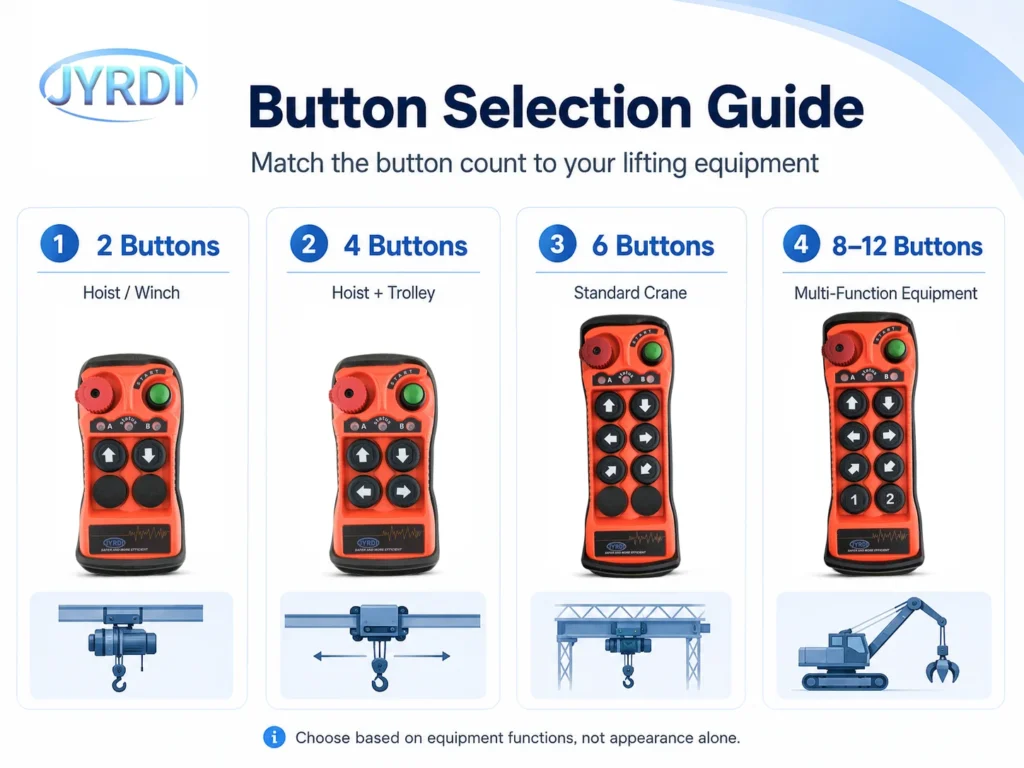
Button quantity is one of the first things buyers notice, but it should be decided by equipment functions.
| Button Type | Suitable Equipment | Typical Functions |
|---|---|---|
| 2 Buttons | Simple hoist, winch, lifting platform | Up / Down |
| 4 Buttons | Hoist with trolley, small crane, tail lift | Up / Down / Left / Right |
| 6 Buttons | Standard overhead crane, bridge crane | Up / Down / East / West / South / North |
| 8 Buttons | Crane with start, spare or auxiliary functions | 6 motions + Start + Spare |
| 10–12 Buttons | Multi-function cranes, custom equipment | Multiple motions, lights, horn, speed or auxiliary control |
For most industrial lifting equipment, it is better to leave one or two spare buttons if the equipment may be upgraded later. Spare buttons can be used for horn, light, start, reset, speed selection or other auxiliary functions.
However, too many buttons can also confuse operators. For simple equipment, a compact remote control with fewer buttons is often safer and easier to use.
Single-Speed vs Dual-Speed Crane Remote Controls
Another important decision is whether you need a single-speed or dual-speed crane remote control.
Single-Speed Remote Control
A single-speed remote control gives one output for each movement direction. When the operator presses the button, the crane moves at one fixed speed.
It is suitable for:
- Simple hoists
- Standard workshop cranes
- Small lifting equipment
- General material handling
- Applications where precise positioning is not critical
Dual-Speed Remote Control
A dual-speed remote control allows slow and fast movement. The first stage of the button can control slow speed, and the second stage can control fast speed.
It is suitable for:
- Dual-speed hoists
- Overhead cranes requiring precise load positioning
- Heavy load handling
- Mold lifting
- Equipment assembly
- Applications where smooth start and accurate placement matter
If your crane already has dual-speed motors or a frequency inverter, you should confirm whether the remote control receiver can provide the correct output logic for slow and fast control.
For lifting equipment that handles heavy loads or requires precise positioning, dual-speed control can improve safety and operating accuracy.
Check Voltage and Receiver Compatibility
A crane remote control is not a standalone device. It must be compatible with the crane’s electrical system.
Before ordering, confirm the receiver input voltage. Common industrial receiver voltage ranges may include AC or DC power, depending on the model. You should check your equipment control cabinet and confirm whether the receiver needs to work with DC power, low-voltage AC power or a wider industrial voltage range.
You should also confirm the output type. Most crane remote control receivers use relay outputs, but the actual wiring depends on the crane control circuit.
Important points to confirm include:
- Receiver power supply voltage
- AC or DC input
- Relay output quantity
- Output contact rating
- Common wire design
- Momentary or maintained output
- Interlock requirements
- Compatibility with contactors, PLC or inverter control
- Emergency stop wiring method
If you are replacing an old remote control, take clear photos of the old receiver, wiring terminals and machine control cabinet. This helps the supplier recommend the correct replacement model and wiring method.
Signal Range and Anti-Interference Performance
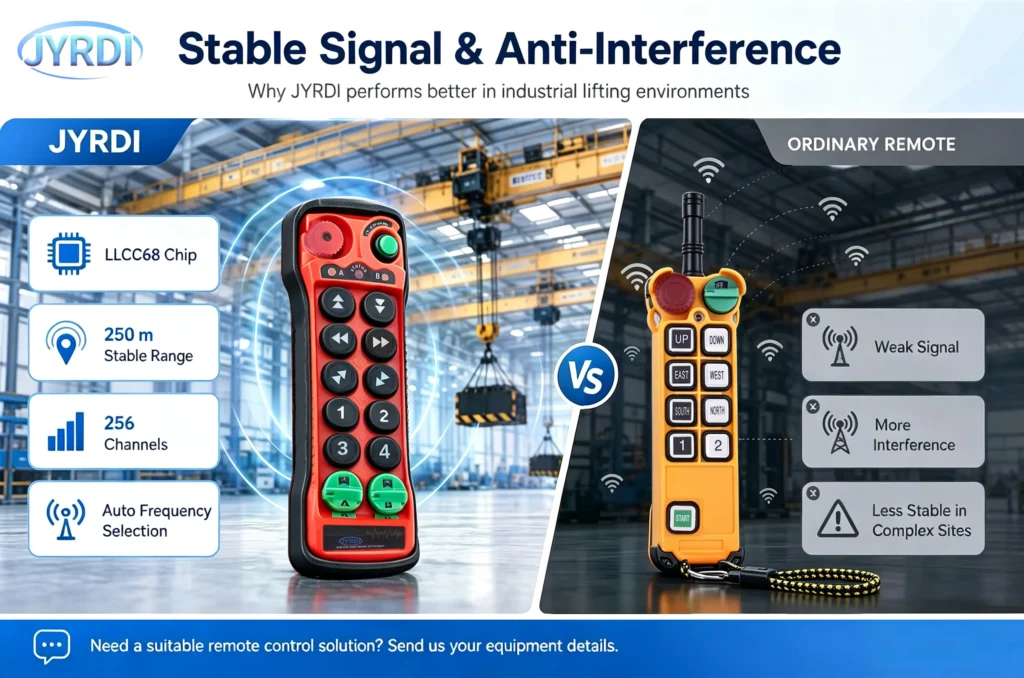
Signal stability is one of the most important factors when choosing a wireless crane remote control.
A good crane remote control should not only transmit signals over a long distance, but also maintain stable communication in a real industrial environment. Factories often have steel structures, motors, frequency inverters, power cables, welding equipment and multiple wireless devices. These can affect wireless communication.
When evaluating signal performance, check:
- Effective operating distance
- Frequency band
- Anti-interference technology
- Channel quantity
- Pairing method
- Signal feedback indicators
- Performance in multi-remote-control environments
For example, an upgraded industrial remote control using an advanced control chip can support frequency modulation, spread spectrum and automatic frequency selection. This helps the system avoid occupied frequencies when multiple remote controls are used in the same workshop.
Some upgraded systems can also improve effective working distance through stronger signal processing. For industrial buyers, this is more valuable than a simple “long range” claim, because real working conditions are often more complex than open-space testing.
A practical recommendation is this: choose a remote control with enough signal margin for your actual site. If your operator normally works within 50 meters, do not choose a product that only barely reaches 50 meters in ideal conditions. Industrial environments require reserve performance.
Safety Features You Should Not Ignore
A crane remote control directly controls lifting equipment. Safety should always come before price.
Key safety features to check include:
Emergency Stop
The transmitter should have a clear emergency stop button. The emergency stop should be easy to identify and difficult to press accidentally during normal operation.
Button Interlock
Opposite movements such as up/down or left/right should not be activated at the same time. Proper interlock logic helps reduce the risk of conflicting commands.
Stable Pairing
The transmitter and receiver should be correctly paired so that one transmitter controls only the intended receiver. This is especially important in workshops with multiple cranes or multiple remote controls.
Clear Status Indication
Signal strength lights, power indicators or status lights help operators and maintenance staff quickly understand whether the transmitter and receiver are connected properly.
Reliable Components
Buttons, relays, crystal oscillators, power modules and circuit design all affect long-term safety. A low-cost remote control may work at first, but unstable components can lead to signal loss, button failure or higher maintenance cost.
Proper Wiring
Even a good remote control can be unsafe if it is wired incorrectly. Always follow the wiring diagram and confirm the emergency stop circuit, common wire and output terminals before operation.
Working Environment and Durability
Industrial lifting equipment may work in harsh environments. The remote control should match the actual working conditions.
Consider the following:
Dust and Water Exposure
For outdoor use, wet workshops, dusty warehouses or construction environments, choose a remote control with suitable dust and water protection.
Shock and Drop Resistance
Operators may use the transmitter every day. A strong housing, protective rubber cover and reliable button structure can reduce damage from accidental drops.
Button Life
Buttons are among the most frequently used parts. Imported or industrial-grade buttons can provide better tactile feedback and longer service life than low-cost alternatives.
Temperature and Humidity
If the equipment works in cold storage, outdoor yards, high-humidity workshops or high-temperature environments, ask the supplier whether the remote control is suitable for those conditions.
Battery and Power Consumption
For the transmitter, low standby power consumption helps reduce battery replacement frequency. Some upgraded remote controls use a power management chip and adjustable signal strength to reduce unnecessary energy consumption.
Pairing, Replacement and Maintenance
For industrial buyers, easy maintenance can be as important as product performance.
A good crane remote control should be easy to pair, replace and service. This is especially important for distributors, equipment manufacturers and maintenance teams.
Common pairing and maintenance considerations include:
- Can the transmitter and receiver be paired by buttons?
- Does the system support card-based pairing?
- Can the SN number or frequency be modified by software?
- Are wiring diagrams available?
- Can spare transmitters be supplied?
- Can button functions be customized?
- Is technical support available after purchase?
If your company operates many cranes, choose a supplier that can support stable model continuity, spare parts and clear technical documentation. A cheap remote control without long-term support may cost more when replacement or troubleshooting is needed.
Crane Remote Control Selection Table
| Application | Recommended Remote Control Type | Key Selection Points |
| Simple electric hoist | 2-button or 4-button remote control | Up/down control, compact design, easy pairing |
| Hoist with trolley | 4-button or 6-button remote control | Up/down + left/right, receiver voltage matching |
| Standard overhead crane | 6-button or 8-button crane remote control | Hoist, trolley, bridge travel, emergency stop |
| Dual-speed overhead crane | Dual-speed 6/8/10-button remote control | Slow/fast control, interlock logic, output matching |
| Gantry crane | Industrial wireless remote control with rugged housing | Signal stability, enclosure protection, outdoor durability |
| Truck crane | Customized push-button or joystick remote control | Hydraulic control logic, output type, wiring confirmation |
| Hydraulic lifting equipment | Custom receiver output remote control | Momentary/maintained output, PLC or valve compatibility |
| Multi-crane workshop | Remote control with multiple channels and stable pairing | Anti-interference, automatic frequency selection, clear identification |
| OEM equipment | Custom remote control solution | Branding, wiring, button layout, receiver integration |
Common Mistakes When Choosing a Crane Remote Control
Mistake 1: Choosing Only by Price
A lower price may look attractive, but industrial lifting equipment requires stable communication, reliable buttons, safe emergency stop and correct receiver output. A cheap remote control with weak components may lead to downtime or maintenance issues.
Mistake 2: Ignoring Receiver Voltage
Many buyers focus only on the transmitter and forget the receiver voltage. If the receiver voltage does not match the crane control cabinet, installation will fail or create safety risks.
Mistake 3: Buying the Wrong Button Type
Single-speed and dual-speed buttons are not the same. If your crane requires slow and fast movement, a standard single-speed remote control may not meet your control requirements.
Mistake 4: Not Confirming Output Logic
Some applications require momentary output, while others need maintained output. Some need interlock logic, while others require independent outputs. Always confirm the control logic before ordering.
Mistake 5: Overlooking Signal Interference
A remote control that works well in open space may not perform the same in a steel-structured factory. Consider motors, inverters, metal obstacles and other wireless devices.
Mistake 6: Not Planning for Spare Parts
For factories and distributors, long-term support matters. Ask whether spare transmitters, receivers, buttons, batteries and wiring support are available.
Mistake 7: Using a General Remote Control for a Special Machine
Not every crane or lifting machine can use a standard remote control. Truck cranes, hydraulic cranes, automation equipment and OEM machines often need customized receiver outputs or button logic.
Recommended Options by Application
For Overhead Cranes
Choose a 6-button or 8-button industrial crane remote control. If the crane has dual-speed movement, use a dual-speed model. Pay attention to emergency stop, interlock logic, receiver voltage and stable signal performance.
For Electric Hoists
Choose a compact 2-button, 4-button or 6-button remote control depending on whether the hoist has trolley movement. This is usually a simple and cost-effective solution.
For Gantry Cranes
Choose a rugged wireless crane remote control with strong signal stability and suitable environmental protection. Outdoor gantry cranes should use a model designed for dust, moisture and mechanical impact.
For Truck Cranes and Hydraulic Equipment
Choose a customized remote control solution. Confirm hydraulic valve control, PLC input, relay output, momentary or maintained output and joystick requirements before ordering.
For OEM Equipment Manufacturers
Choose a supplier that supports OEM/ODM customization, stable supply, button function customization, receiver integration and technical documentation. OEM buyers should not only compare product price, but also evaluate engineering support.
What Makes an Industrial Crane Remote Control More Reliable?
For industrial lifting equipment, reliability depends on both hardware and software.
A more reliable remote control usually has:
- A stable control chip
- Strong anti-interference performance
- Multiple available channels
- High-quality crystal oscillator
- Industrial-grade buttons
- Improved power module design
- Clear signal and status indicators
- Reliable transmitter-receiver pairing
- Proper emergency stop design
- Technical support for wiring and replacement
For example, an upgraded Q Series crane remote control may use an LLCC68 control chip, automatic frequency selection, 256 channels, Japan KDS crystal, imported buttons and bidirectional communication between transmitter and receiver. These upgrades are designed to improve signal stability, reduce interference risk and make the remote control easier to monitor during daily operation.
Questions to Ask Before Ordering a Crane Remote Control
Before purchasing a crane remote control, prepare the following information:
- What type of lifting equipment do you use?
- How many movements need to be controlled?
- Do you need single-speed or dual-speed control?
- What is the receiver input voltage?
- Do you need momentary or maintained output?
- Is the machine controlled by contactors, relays, PLC or hydraulic valves?
- What operating distance do you need?
- Will multiple remote controls work in the same area?
- Is the equipment used indoors or outdoors?
- Do you need spare transmitters or custom button functions?
- Do you need OEM branding or special wiring?
- Can you provide photos of the old receiver or wiring diagram?
The more information you provide, the easier it is for the supplier to recommend the correct model.
Product Recommendation
If you need a crane remote control for overhead cranes, hoists, gantry cranes or general industrial lifting equipment, JIAYI offers industrial wireless remote control solutions with multiple button options, single-speed and dual-speed models, receiver voltage options and customization support.
For standard lifting applications, you can start with a push-button industrial crane remote control. For more complex equipment, our technical team can help you confirm button functions, receiver wiring, voltage, pairing method and suitable control logic.
View Industrial Remote Control Products →
Need help choosing the right model? Send us your equipment type, voltage, required functions and wiring photos. Our team will recommend a suitable crane remote control solution.
Conclusion
Choosing a crane remote control is not just about selecting a transmitter with enough buttons. The right choice depends on your lifting equipment, control functions, voltage, receiver wiring, signal environment, safety requirements and long-term maintenance needs.
For simple hoists, a compact 2-button or 4-button remote control may be enough. For overhead cranes and gantry cranes, a 6-button or 8-button industrial wireless remote control is usually more suitable. For dual-speed cranes, hydraulic equipment or OEM machinery, customized output logic may be required.
A reliable crane remote control should make lifting operation safer, easier and more efficient. Before ordering, confirm the application, voltage, button logic and working environment. This will help you avoid wrong selection, reduce installation problems and improve long-term equipment reliability.
FAQ
1. What type of remote control is best for an overhead crane?
For most overhead cranes, a 6-button or 8-button industrial wireless remote control is suitable. It usually controls hoisting, trolley travel and bridge travel. If the crane has dual-speed movement, choose a dual-speed crane remote control.
2. Can one crane remote control work with any crane?
No. A crane remote control must match the receiver voltage, output type, wiring method and control logic of the crane. Before ordering, confirm your equipment type, voltage and required functions.
3. What is the difference between single-speed and dual-speed crane remote controls?
A single-speed remote control provides one output for each movement direction. A dual-speed remote control supports slow and fast movement, which is useful for precise load positioning and heavy lifting applications.
4. How many buttons do I need for a crane remote control?
It depends on the number of functions. A simple hoist may need 2 or 4 buttons. A standard overhead crane usually needs 6 or 8 buttons. More complex equipment may require 10 or 12 buttons.
5. Why is signal stability important for crane remote controls?
Signal stability affects safe and continuous operation. Industrial environments often include steel structures, motors, inverters and other wireless devices. A good crane remote control should have strong anti-interference performance and enough operating distance.
6. Can I replace an old crane remote control with a new one?
Yes, but you should confirm the old receiver voltage, wiring terminals, output logic and controlled equipment functions. Clear photos of the old receiver and wiring diagram can help the supplier recommend the correct replacement.
7. Are wireless crane remote controls safe?
Wireless crane remote controls are safe when they are properly selected, installed and maintained. Important safety features include emergency stop, button interlock, stable pairing, clear status indication and correct wiring.
8. What information should I provide when buying a crane remote control?
You should provide equipment type, required button functions, receiver voltage, operating distance, single-speed or dual-speed requirement, working environment and wiring photos if available.