Short Answer
An overhead crane remote control should be selected as a complete transmitter-and-receiver system, not as a handheld device only. Buyers should confirm the crane motion functions, button layout, receiver power supply, relay output type, emergency stop circuit, single-speed or dual-speed control logic, and the workshop environment before ordering. For overhead cranes, bridge cranes and electric hoists, the best radio remote system is the one that matches the existing control cabinet and provides predictable motion control, stable communication and clear transmitter-receiver pairing. If the crane uses PLC, VFD, dual-speed contactors or special safety requirements, the wiring diagram should be reviewed before selecting a model.
What Is an Overhead Crane Remote Control System?
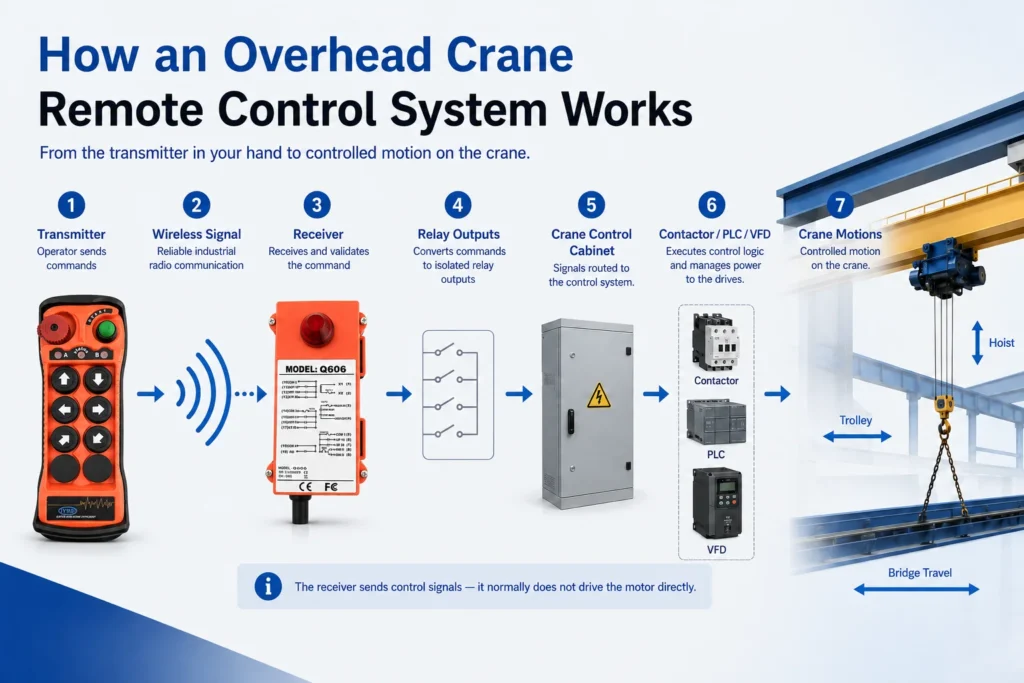
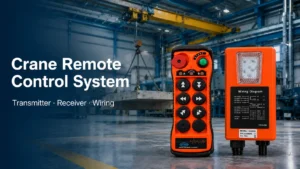
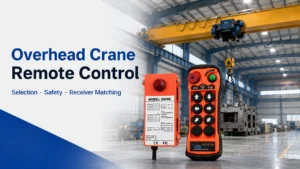
An overhead crane remote control is a radio control system used to operate crane motions from a handheld transmitter. It is commonly used for overhead cranes, bridge cranes, electric hoists and workshop lifting equipment.
A typical overhead crane remote control system includes:
- Handheld transmitter
- Receiver
- Relay outputs
- Receiver power supply connection
- Emergency stop circuit interface
- Transmitter-receiver pairing
- Button labels or function markings
- Wiring connection to the crane electrical panel
In most applications, the receiver does not directly drive the crane motor. Instead, it sends control signals to the existing crane control circuit, contactors, PLC inputs or other control devices inside the electrical panel.
This is why receiver matching is critical. The voltage, output type, contact logic and emergency stop integration must be checked before installation.
A well-matched system should allow the operator to control the crane from a better viewing position while keeping each motion command predictable and easy to troubleshoot.
Why Overhead Cranes Use Wireless Remote Control
A wired pendant control is still used in many workshops, but it limits the operator’s movement. The operator may need to walk close to the load, follow the pendant cable and work from a fixed position.
A wireless overhead crane remote control gives the operator more flexibility. The operator can choose a better viewing angle, stand away from the suspended load and avoid dragging a pendant cable across the work area.
This is useful in:
- Manufacturing plants
- Steel-structure workshops
- Warehouses
- Maintenance facilities
- Assembly lines
- Heavy equipment workshops
- Multi-crane work areas
For many overhead crane applications, a wireless remote system can be used to replace or upgrade a wired pendant control, provided that the receiver voltage, relay output logic, emergency stop circuit and control cabinet wiring are correctly verified by a qualified technician.
The main benefits are practical:
| Benefit | What It Means in Daily Operation |
|---|---|
| Better operating position | The operator can move to a clearer viewing angle |
| Reduced cable problems | No pendant cable dragging, bending or breaking |
| More flexible movement | Suitable for longer crane travel and larger workshops |
| Easier operation | Operators are not restricted by pendant cable length |
| Better site visibility | Helpful when positioning loads around machines or materials |
| Easier replacement planning | Old pendant systems can often be upgraded after wiring confirmation |
Wireless control should not be selected only because it is convenient. It must match the crane’s electrical system and operating conditions.
Transmitter, Receiver and Relay Outputs: What Must Match
An overhead crane remote control system has two main parts: the transmitter and the receiver.
Transmitter
The transmitter is the handheld device used by the operator. It sends motion commands to the receiver.
Common transmitter features include:
- Hoist up / down buttons
- Trolley travel buttons
- Bridge travel buttons
- Start / stop buttons
- Emergency stop button
- Signal indicator
- Battery indicator
- Single-speed or dual-speed buttons
- Rubber sleeve or anti-slip housing
- Custom button labels
The transmitter should be easy to hold, easy to identify and simple enough for daily operation. Too many buttons can create confusion if the crane does not need them.
Receiver
The receiver is installed near or inside the crane electrical control panel. It receives commands from the transmitter and provides outputs to the crane control circuit.
The receiver must match:
- Power supply voltage
- AC or DC control voltage
- Relay output quantity
- Contact type
- Common wire arrangement
- Emergency stop circuit
- Momentary or maintained output logic
- Crane control architecture
- Transmitter pairing method
For replacement projects, the receiver is usually more important than the transmitter appearance. A transmitter may look correct, but if the receiver output does not match the existing electrical panel, the system will not be suitable.
Relay Outputs
Most overhead crane remote control receivers use relay outputs. Each button on the transmitter usually corresponds to one or more relay outputs inside the receiver.
Typical crane motion terminology should be understood clearly:
| Common Button Label | More Professional Function Name |
|---|---|
| Up / Down | Hoist up / down |
| East / West | Trolley left / right or cross travel |
| South / North | Bridge travel forward / reverse or long travel |
| Start / Stop | Main control start / stop |
| Fast / Slow | Dual-speed control output |
This terminology matters because different cranes may use different panel labels. Buyers should confirm actual crane motions instead of relying only on button names.
How Many Buttons Do You Need?
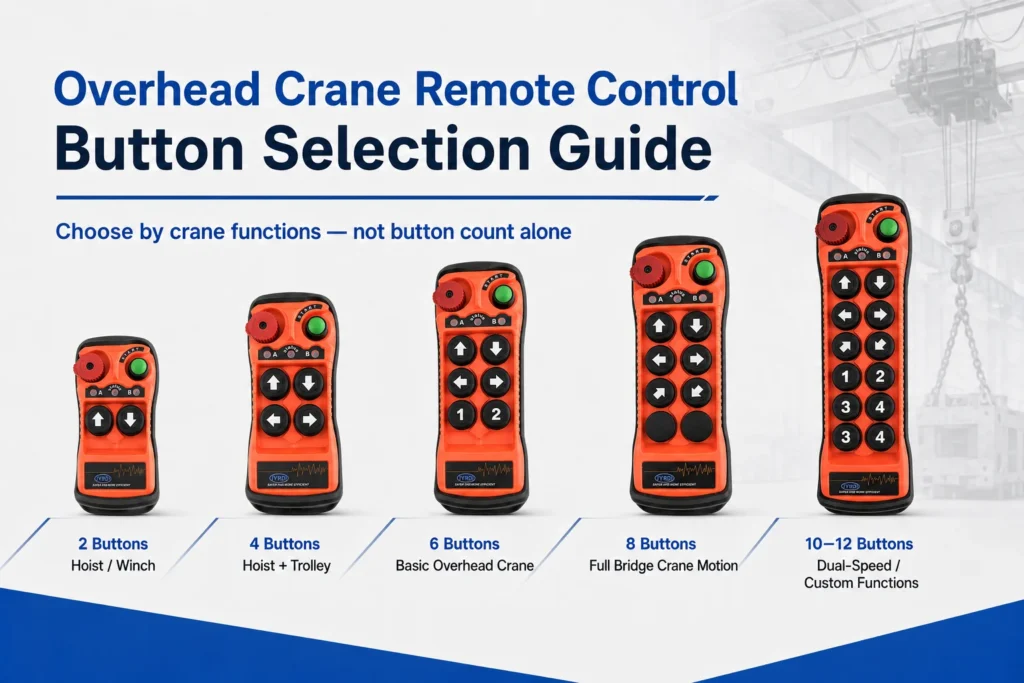
Button quantity should be based on the crane’s actual motion commands.
A simple hoist may only require up and down control. A standard overhead crane usually needs hoist movement, trolley travel, start and stop. A bridge crane with long travel normally requires more control functions.
For dual-speed cranes, button quantity alone is not enough. The receiver must also provide the correct output logic for low-speed and high-speed commands.
Button Selection Table
| Button Layout | Typical Equipment | Typical Functions | Note |
|---|---|---|---|
| 2 buttons | Simple electric hoist or winch | Hoist up / down | Not a full overhead crane control |
| 4 buttons | Hoist with trolley | Hoist up / down + trolley left / right | For limited travel functions |
| 6 buttons | Basic overhead crane | Hoist + trolley + start / stop | Common for simple overhead crane systems |
| 8 buttons | Standard bridge crane | Hoist + trolley + bridge travel + start / stop | Common for full crane motion control |
| 10–12 buttons | Custom crane system | Dual-speed, auxiliary hook or special outputs | Requires wiring confirmation |
For most overhead cranes, 6-button or 8-button transmitters are common. For more complex systems, especially dual-speed or auxiliary-function cranes, the button layout should be confirmed with the wiring diagram.
A good selection rule is simple:
Choose enough buttons to match the actual control functions, but avoid unnecessary buttons that may confuse the operator.
Single-Speed vs Dual-Speed Overhead Crane Control
Before selecting a remote system, buyers should confirm whether the crane is single-speed or dual-speed.
Single-Speed Control
Single-speed control means each motion direction has one operating speed. When the operator presses the button, the crane moves at one fixed speed.
Single-speed remote systems are commonly used for:
- General workshop lifting
- Simple bridge cranes
- Standard electric hoists
- Basic material handling
- Short-distance load movement
The wiring is usually simpler because each motion direction normally requires one output.
Dual-Speed Control
Dual-speed control allows slow and fast movement. This is useful when the operator needs better positioning accuracy.
Dual-speed control is often used for:
- Mold handling
- Heavy load positioning
- Equipment assembly
- Steel structure handling
- Maintenance operations
- Applications requiring smoother movement
Dual-speed systems require more careful receiver matching. A dual-speed crane may need separate outputs for low-speed and high-speed commands.
Single-Speed vs Dual-Speed Comparison
| Item | Single-Speed Remote Control | Dual-Speed Remote Control |
|---|---|---|
| Motion control | One speed per direction | Slow and fast movement |
| Typical use | General lifting | More precise positioning |
| Wiring complexity | Simpler | More outputs and logic confirmation |
| Receiver requirement | Basic relay output matching | Low-speed and high-speed output matching |
| Common risk | Choosing too few functions | Wrong speed logic or output mismatch |
| Best practice | Confirm motion functions and voltage | Review wiring diagram before ordering |
If you are not sure whether your crane is single-speed or dual-speed, check the original pendant, contactor labels, inverter settings or crane electrical drawing before choosing a model.
Receiver Voltage, Dry Contact and Control Cabinet Matching
Receiver voltage is one of the most important details before ordering an overhead crane remote control system.
The receiver must match the crane control panel power supply. If the voltage is wrong, the system may fail to work or the receiver may be damaged.
Before ordering, buyers should confirm:
- Receiver power supply voltage
- AC or DC control voltage
- Relay output quantity
- Dry contact or powered output
- Normally open or normally closed contact requirements
- Common wire arrangement
- Momentary or maintained output logic
- Emergency stop circuit integration
- Whether the crane uses contactors, PLC inputs or VFD control
Dry Contact vs Powered Output
This is a key point that many buyers overlook.
A dry contact relay output acts like a switch. It does not provide its own power to the controlled circuit. It only opens or closes the circuit according to the control command.
A powered output provides voltage directly to the connected device or control circuit. This must be matched very carefully with the electrical panel.
| Output Type | Meaning | Common Use |
|---|---|---|
| Dry contact relay output | Acts as a switch without supplying power | Common for crane control circuits |
| Powered output | Sends voltage to the connected circuit | Requires exact voltage and wiring confirmation |
| Momentary output | Active only while the button is pressed | Common for crane motion commands |
| Maintained output | Stays active after pressing | Used carefully for special functions |
| Interlocked output | Prevents opposite directions from working together | Used for hoist, trolley and bridge travel |
For most crane motion commands, momentary outputs are commonly preferred. Maintained outputs may be used for some auxiliary functions, but they should not be applied to motion control unless the crane system is designed for it.
The installer should also verify normally open or normally closed contact requirements and the common wire arrangement before connecting the receiver.
When the Crane Uses PLC or VFD Control
Not all overhead cranes use simple contactor control.
Some modern cranes may use:
- PLC input control
- Frequency inverter control
- VFD-controlled hoist or trolley movement
- Dual-speed contactor control
- Customized control panels
- Special interlock logic
- Integrated safety relays
If the overhead crane is controlled by a PLC or frequency inverter, the remote receiver should be matched to the required input signal type.
In many cases, the receiver does not directly drive the motor. It sends control signals to the existing control system. The PLC, VFD or contactor circuit then handles the machine operation.
For this type of crane, buyers should provide:
- Wiring diagram
- I/O requirement
- Control voltage
- Input signal type
- Existing pendant wiring
- Control cabinet photos
- Required button logic
- Safety circuit information
A standard remote control may still be suitable, but it should not be selected only by button quantity. The receiver output must match the crane’s control architecture.
Emergency Stop and Signal Loss Behavior
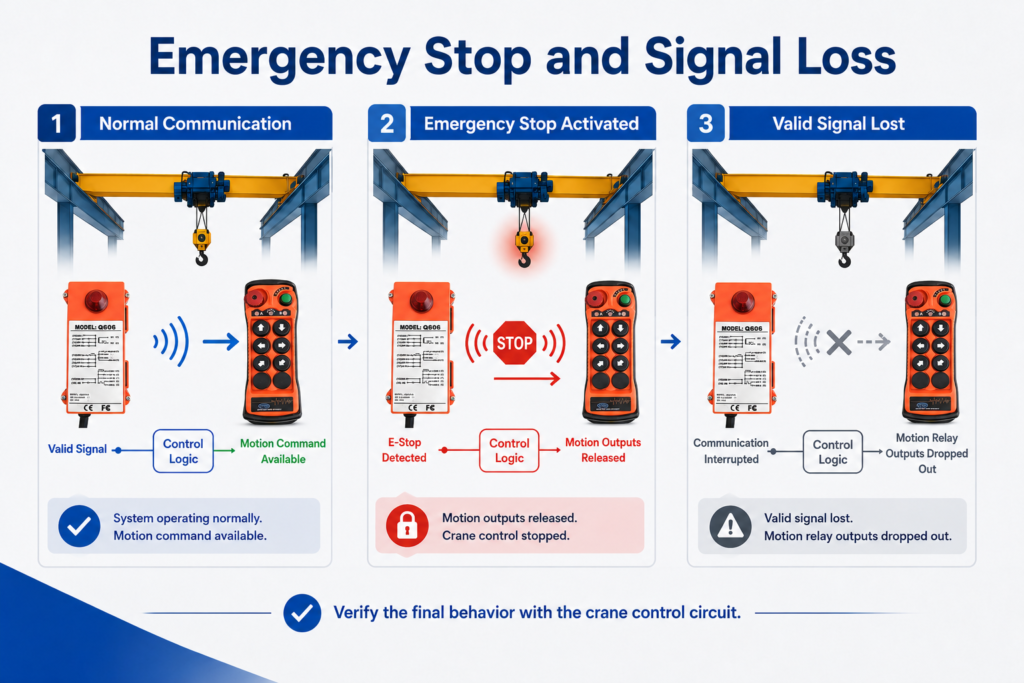
The emergency stop button on the transmitter is an important safety-related function, but it should not be treated as a complete safety system by itself.
It must be integrated into the crane control circuit according to the machine design and site safety requirements.
Buyers should confirm:
- How the emergency stop is connected
- Whether the circuit uses normally closed or normally open logic
- Whether additional safety relays are required
- What happens when the emergency stop is activated
- What happens when communication is interrupted
- Whether motion outputs drop out when valid communication is lost
What Should Happen If the Signal Is Lost?
Buyers should always ask this question:
What happens if the transmitter and receiver lose valid communication?
In most crane remote control applications, motion outputs should be designed to drop out when valid communication is lost. The final stop behavior depends on the receiver design, crane control circuit and site safety architecture.
This is especially important for:
- Hoist up / down
- Trolley travel
- Bridge travel
- Dual-speed movement
- Heavy load positioning
- Multi-crane workshops
For applications requiring certified safety functions, the remote control system should be evaluated together with the crane’s existing safety relay, contactor and control architecture.
A reliable supplier should be able to explain the receiver output behavior and recommend that a qualified electrician or technician verify the final wiring.
Signal Stability in Steel-Structure Workshops
An overhead crane usually works in a complex industrial environment, not in open space.
Signal performance may be affected by:
- Steel beams
- Crane rails
- Large metal structures
- Electric motors
- Frequency inverters
- Welding equipment
- Power cables
- Control cabinets
- Multiple wireless systems
- Other crane remote controls
Because of this, buyers should not only ask:
How far can the remote control work?
They should also ask:
Can it work reliably in my workshop?
A long open-area range does not always mean the same performance inside a steel-structure factory. Metal structures, motors and control cabinets can reduce practical range.
For industrial overhead crane applications, the best choice is a radio remote system with enough signal margin for the actual site.
Important signal-related factors include:
- Communication chipset
- Receiver sensitivity
- Channel quantity
- Frequency stability
- Power filtering
- Antenna position
- Battery condition
- Pairing method
- Status indication
For example, an upgraded industrial remote system may use improved communication processing, multiple channel options and clearer transmitter-receiver feedback to help reduce signal problems in complex workshops.
Multi-Crane Operation and Frequency Planning
Many factories operate several overhead cranes in the same workshop. In this situation, frequency planning and transmitter-receiver pairing become very important.
Each transmitter should be clearly paired with its own receiver and assigned to one crane.
For example:
- Remote 1 → Crane 1
- Remote 2 → Crane 2
- Remote 3 → Crane 3
A well-managed multi-crane setup should include:
- Clear transmitter labels
- Clear receiver labels
- Stable pairing
- Enough available channels
- Commissioning records
- Spare transmitter management
- Operator training
- Routine inspection
More available channels can help with frequency planning in workshops where several radio remote systems operate at the same time. However, channel quantity alone does not guarantee a reliable multi-crane setup.
Proper pairing, clear labeling, commissioning records and operator training are also required.
For workshops with many cranes, this is where a system with multiple channel options, stable pairing and signal status indication becomes valuable.
When a Standard Push-Button Remote Is Not Enough
A standard push-button overhead crane remote control is suitable for many common applications. However, not every crane should use a standard model without further evaluation.
Additional engineering confirmation may be needed when:
- The crane uses proportional hydraulic control
- The crane requires certified functional safety integration
- The site has strict safety approval requirements
- The receiver wiring cannot be modified
- The crane uses a special PLC program
- The crane uses VFD control with special input requirements
- The application involves synchronized crane operation
- The crane has dual hoists or multi-hook control
- The old control system is unclear or undocumented
- The operating environment has extreme electromagnetic interference
In these cases, buyers should provide wiring diagrams, control cabinet photos and operation requirements before selecting a model.
A professional supplier should not recommend a model only by asking how many buttons are needed. The correct selection depends on voltage, output logic, control method, safety requirements and working environment.
Common Selection Mistakes
Mistake 1: Choosing by Button Quantity Only
Button quantity matters, but it is not enough. Two 8-button remote controls may have different receiver voltage, output logic, relay configuration and emergency stop wiring.
Mistake 2: Ignoring Receiver Voltage
Wrong receiver voltage can cause installation failure or damage. Buyers should confirm AC or DC voltage before ordering.
Mistake 3: Not Checking Dry Contact or Powered Output
Some receivers provide dry contact relay outputs, while others may provide powered outputs. The wrong output type can create wiring problems.
Mistake 4: Not Confirming Single-Speed or Dual-Speed Logic
Dual-speed cranes require more careful output planning. A standard single-speed receiver may not match the control logic.
Mistake 5: Treating Emergency Stop as Only a Button
The emergency stop button must be integrated correctly into the crane control circuit. It is not only a red button on the transmitter.
Mistake 6: Ignoring Signal Conditions in the Workshop
Steel structures, motors, inverters and power cables can affect wireless communication. Choose a system with enough signal margin for the real environment.
Mistake 7: Using One Remote for Multiple Cranes Without Planning
Each transmitter and receiver should be clearly paired and labeled. Poor pairing and labeling can create confusion in daily operation.
Mistake 8: Not Providing Photos or Wiring Diagrams
Without wiring information, the supplier may not be able to recommend the correct receiver type or output logic.
Mistake 9: Buying the Cheapest Option for a Heavy-Duty Crane
For industrial lifting equipment, downtime, incorrect wiring and troubleshooting costs can be much higher than the price difference between a basic remote and a more suitable industrial remote system.
What to Send Before Ordering
Before ordering an overhead crane remote control system, prepare the following information:
- Crane type: overhead crane, bridge crane, hoist or gantry crane
- Number of crane motions
- Required button functions
- Single-speed or dual-speed requirement
- Receiver power supply voltage
- AC or DC control voltage
- Dry contact or powered output requirement
- Relay output quantity
- Momentary or maintained output logic
- Emergency stop wiring requirement
- Whether the crane uses contactors, PLC or VFD control
- Whether multiple cranes work in the same workshop
- Required operating distance
- Indoor, outdoor, dusty or wet environment
- Photos of the old pendant, receiver or control cabinet
- Wiring diagram, if available
- OEM branding or custom button label requirements
The more complete the information, the easier it is to recommend the correct transmitter-and-receiver set.
For replacement projects, clear photos of the old receiver and control cabinet are especially helpful. They allow the supplier to check voltage, wiring terminals, output logic and installation space before recommending a model.
Recommended JIAYI / JYRDI Solution
For standard overhead cranes, electric hoists and bridge cranes using relay-based control circuits, the JIAYI / JYRDI Q Series can be considered when buyers need a transmitter-and-receiver set with clear button layouts, stable pairing and multiple channel options.
For replacement projects, the correct model should be confirmed based on:
- Receiver voltage
- Output logic
- Emergency stop wiring
- Required button functions
- Working distance
- Control cabinet photos
- Single-speed or dual-speed control
- Site environment
For workshops using several cranes, available channel options and clear transmitter-receiver pairing can help with frequency planning and reduce the risk of remote-control conflict.
The upgraded Q Series can also support features such as multiple available channels, automatic frequency selection, signal status indication and bidirectional communication between transmitter and receiver, depending on the model configuration.
If the crane uses PLC, VFD, dual-speed control or special safety requirements, the wiring diagram should be reviewed before recommendation.
View Industrial Remote Control Products →industrial-remote-control
Send Your Crane Details for Model Recommendation →contact
Conclusion
Choosing an overhead crane remote control is not only about selecting a handheld transmitter. It is a complete control system decision involving transmitter functions, receiver voltage, relay outputs, emergency stop integration, signal behavior and site conditions.
For most overhead cranes, buyers should confirm:
- How many motions need to be controlled
- Whether the crane is single-speed or dual-speed
- What receiver voltage is required
- Whether dry contact or powered output is needed
- How the emergency stop circuit should be integrated
- Whether the crane uses contactors, PLC or VFD control
- Whether multiple cranes work in the same workshop
- Whether the site requires stronger signal stability or channel planning
A suitable overhead crane wireless remote control can improve operator flexibility, reduce pendant cable problems and support more predictable lifting operation. The best choice is not always the cheapest model or the one with the most buttons. It is the system that matches your crane, your electrical panel and your working environment.
FAQ
What is an overhead crane remote control?
An overhead crane remote control is a radio control system used to operate an overhead crane, bridge crane or electric hoist from a handheld transmitter. It usually includes a transmitter and a receiver connected to the crane electrical control panel.
Can a wireless remote control replace a wired pendant control?
Yes, in many overhead crane applications, a wireless remote control system can replace or upgrade a wired pendant. However, receiver voltage, relay output logic, emergency stop wiring and control cabinet compatibility should be verified by a qualified technician before installation.
How many buttons do I need for an overhead crane remote control?
For many overhead cranes, 6 or 8 buttons are common. A 6-button system may control hoist movement, trolley travel, start and stop. An 8-button system can also include bridge travel. Dual-speed or custom cranes may need more outputs and a different button layout.
What is the difference between single-speed and dual-speed crane remote control?
Single-speed control provides one speed for each motion direction. Dual-speed control provides slow and fast movement, which is useful for more accurate load positioning. Dual-speed cranes usually require more receiver outputs and careful wiring confirmation.
What voltage should the receiver use?
The receiver voltage must match the crane control panel power supply. Buyers should confirm whether the control voltage is AC or DC and provide the correct voltage requirement before ordering.
What is dry contact output in a crane remote control receiver?
A dry contact relay output acts like a switch and does not supply its own voltage to the circuit. It opens or closes the circuit according to the control command. This is commonly used in crane control systems, but the final wiring must match the electrical panel design.
Is an overhead crane wireless remote control safe?
It can be safe when properly selected, wired, tested and maintained. Important points include emergency stop integration, button interlock, signal loss behavior, receiver output logic, transmitter-receiver pairing and operator training.
What happens if the remote signal is lost?
In most crane remote control applications, motion outputs should be designed to drop out when valid communication is lost. The final stop behavior depends on the receiver design, crane control circuit and site safety architecture.
Can multiple overhead crane remote controls work in the same workshop?
Yes. Each transmitter should be clearly paired with its own receiver and assigned to one crane. More available channels can help with frequency planning, but clear labeling, commissioning records and operator training are also important.
What information should I send before ordering an overhead crane remote control?
You should send the crane type, required functions, receiver voltage, single-speed or dual-speed requirement, output type, emergency stop requirement, working distance, site environment and photos of the old pendant, receiver or control cabinet if available.