
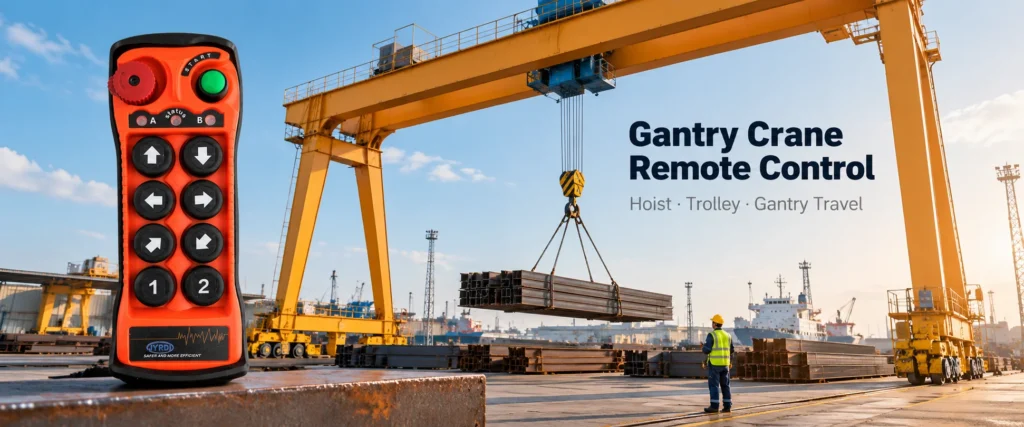
JIAYI provides wireless remote control systems for gantry cranes, electric hoists, powered trolleys and industrial lifting equipment.
A gantry crane may require control of the hoist, trolley and the gantry itself, so selecting the right remote involves more than choosing the number of buttons.
The transmitter and receiver should be matched according to the actual crane movements, control voltage, single- or dual-speed logic, receiver outputs, working environment and existing wiring.
Push-Button Control · Single / Dual Speed · Multiple Receiver Voltage Options · Custom Functions
Get a Gantry Crane Remote Recommendation
What Remote Control Does a Gantry Crane Need?
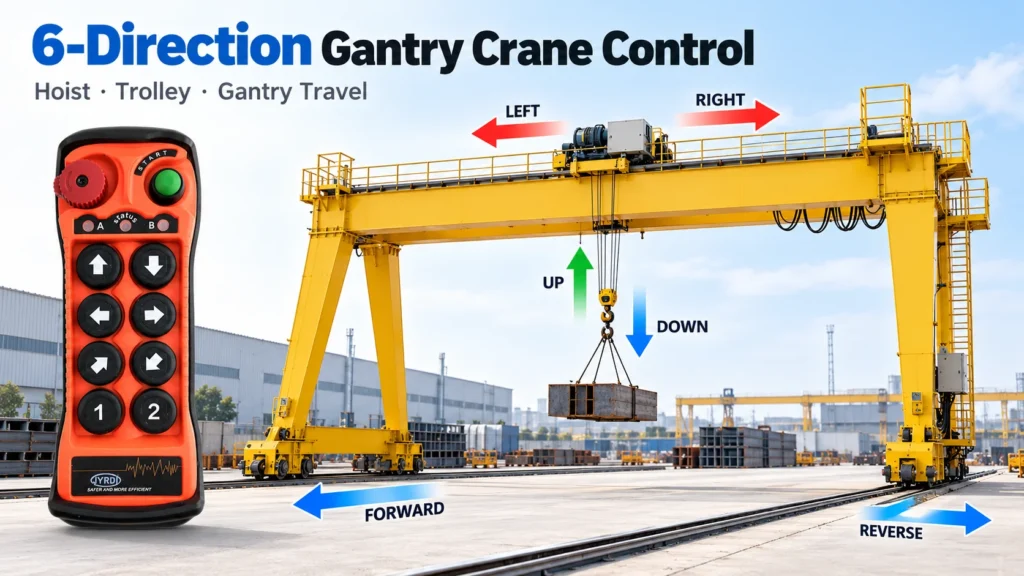
The correct configuration depends on how the gantry crane moves.
A simple gantry crane may only require wireless control of the electric hoist, while a powered system may also require trolley travel and gantry travel.
Typical functions include:
- Hoist Up / Down
- Trolley Left / Right
- Gantry Forward / Reverse
- Start / Enable
- Horn
- Lighting
- Auxiliary functions
For many powered gantry cranes, six directional commands are a common starting point:
Up · Down · Left · Right · Forward · Reverse
However, button quantity alone does not determine compatibility.
Before selecting a remote, confirm:
- Required crane movements
- Control voltage
- Single- or dual-speed operation
- Receiver output logic
- Existing contactor, PLC or drive interface
- Stop or enable circuit
- Wired pendant arrangement
- Indoor or outdoor working conditions
The receiver must match the actual crane control system—not just the transmitter button layout.
Send Your Gantry Crane Information
Gantry Crane Applications We Support
Wireless remote control can be used with different gantry crane configurations.
Fixed Gantry Crane With Electric Hoist
Some gantry cranes have a fixed structure while the electric hoist and trolley provide the main movements.
Typical functions may include:
Hoist Up / Down
or:
Hoist Up / Down + Trolley Left / Right
These applications may use a compact push-button remote when only a limited number of movements are required.
Powered Trolley Gantry Crane
When the hoist travels along the gantry beam using a powered trolley, the operator usually needs:
Up · Down · Left · Right
This is a common four-direction control application.
The receiver voltage and output arrangement must still match the existing trolley and hoist control circuit.
Motorized Gantry Crane
A motorized gantry crane may require control of three motion groups:
Hoist: Up / Down
Trolley: Left / Right
Gantry: Forward / Reverse
This normally requires at least six directional commands before auxiliary functions are considered.
Additional controls may include:
- Start
- Horn
- Lighting
- Selector switches
- Auxiliary equipment
Outdoor Gantry Crane
Outdoor gantry cranes often operate across larger work areas such as:
- Storage yards
- Steel handling areas
- Precast yards
- Logistics sites
- Manufacturing facilities
Wireless control can allow the operator to change position according to the load and travel path instead of remaining limited by a pendant cable.
For outdoor applications, receiver installation, enclosure protection, antenna position and actual radio conditions should be considered during system selection.
How Many Buttons Does a Gantry Crane Remote Need?
The required number of buttons depends on the crane functions.
| Gantry Crane Configuration | Typical Functions | Starting Configuration |
|---|---|---|
| Fixed hoist only | Up / Down | 2-direction control |
| Hoist + powered trolley | Up / Down + Left / Right | 4-direction control |
| Powered gantry crane | Hoist + trolley + gantry travel | 6-direction control |
| Dual-speed gantry crane | Two-stage movement buttons | Dual-speed configuration |
| Crane with auxiliaries | Main movements + horn / selector / lighting | 8–12 buttons or customized system |
Important
Two six-button remotes may still be electrically different.
The crane may use different:
- Control voltages
- Common terminals
- Speed sequences
- Relay arrangements
- Interlocking logic
- PLC or drive inputs
Always review the receiver and crane wiring before confirming the model.
Single-Speed vs Dual-Speed Gantry Crane Control
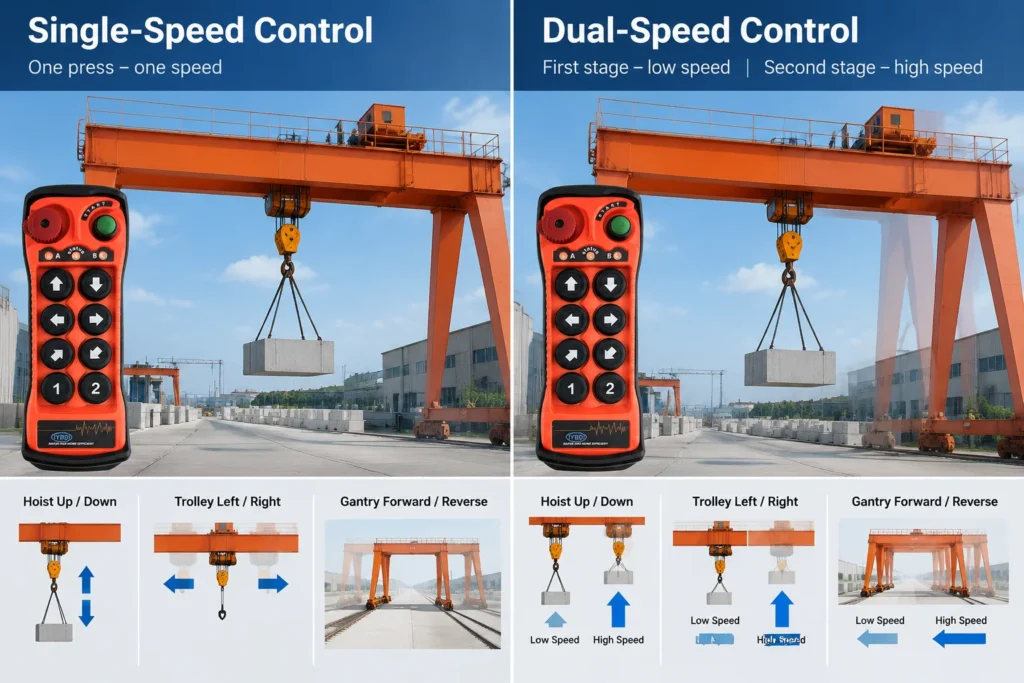
Speed configuration is one of the most important selection factors for gantry cranes.
Single-Speed Control
A single-speed button normally sends one movement command.
For example:
Forward Button → Receiver Output → Contactor or Drive Input → Gantry Forward
This arrangement is suitable for cranes where each movement operates at one commanded speed.
Dual-Speed Control
Dual-speed buttons normally provide two operating stages.
A typical arrangement may be:
First Stage → Low Speed
Second Stage → High Speed or Additional Speed Input
This can be useful for applications where the operator needs slower positioning near the final load location and faster travel across a larger work area.
However, dual-speed logic is not identical on every gantry crane.
Some systems keep the first-stage output active while the second stage is pressed. Others use a different output combination.
The wireless receiver must reproduce the original crane speed-control sequence.
Dual Speed Is Not Proportional Control
Two-stage push-button control should not be confused with:
- Stepless speed control
- Analog control
- Proportional joystick control
- PWM output
- CAN communication
If the crane uses a more complex motion-control system, the transmitter and receiver interface should be reviewed separately.
Receiver Matching Matters More Than Button Count
The handheld transmitter is only one part of the gantry crane wireless control system.
Correct receiver matching determines whether the remote can integrate properly with the crane.
1. Confirm the Control Voltage
Do not select the receiver only from the main crane power supply.
The motor circuit and control circuit may use different voltages.
Check:
- Wiring diagram
- Control transformer
- Contactor-coil label
- Existing pendant circuit
- Existing receiver
- Control cabinet terminal markings
2. Confirm Every Crane Movement
List all functions that must be controlled.
For example:
- Hoist Up / Down
- Trolley Left / Right
- Gantry Forward / Reverse
- Start / Enable
- Horn
- Lighting
- Auxiliary devices
3. Confirm Speed Logic
Determine whether each movement is:
- Single speed
- Dual speed
- Drive controlled
- PLC controlled
Different crane axes may also use different speed arrangements.
4. Confirm Receiver Outputs
The receiver may interface with:
- Contactor coils
- PLC digital inputs
- Intermediate relays
- Compatible drive inputs
The required output arrangement should be confirmed from the electrical diagram.
5. Confirm Directional Interlocking
Opposing directions must not operate simultaneously.
Typical opposing pairs include:
Up / Down
Left / Right
Forward / Reverse
Existing interlocking functions should remain effective after wireless control is added.
6. Review the Stop or Enable Function
The stop function must be integrated into the existing crane control architecture.
The presence of a red button on the transmitter alone does not define the safety performance of the complete crane system.
Recommended JIAYI Remote Control Configurations for Gantry Cranes
The following configurations provide useful starting points.
Final selection should always be based on the actual crane functions and control wiring.
Q400 / Q404 — Hoist and Trolley Control
A four-direction configuration can be suitable when the gantry structure itself is not motorized and the main controlled movements are:
Up · Down · Left · Right
Typical applications include:
- Fixed gantry crane
- Electric hoist with powered trolley
- Workshop gantry
- Monorail-type lifting systems
View Q400 / Q404
Q600 / Q606 — Hoist, Trolley and Gantry Travel
For a powered gantry crane requiring six directional movements, a six-button configuration is often a practical starting point.
Typical commands:
Up · Down
Left · Right
Forward · Reverse
Single-speed and dual-speed configurations should be matched to the crane control logic.
View Q600 / Q606
Q800 / Q808 — Additional Functions
An eight-button configuration can be considered when the crane requires additional commands beyond the six primary movements.
Typical additional functions may include:
- Horn
- Lighting
- Start or enable
- Auxiliary equipment
- Additional machine functions
The final button and receiver-output arrangement should be confirmed before ordering.
View Q800 / Q808
F23 Series — Gantry Crane and Material Handling Applications
The F23 Series can also be considered for gantry cranes, overhead cranes, hoists and other material-handling equipment.
It is suitable for projects requiring a conventional industrial push-button remote configuration with multiple receiver-voltage and function options.
How Does a Gantry Crane Wireless Remote Control Work?
A typical system follows this control path:
Operator
↓
Wireless Transmitter
↓
Radio Signal
↓
Industrial Receiver
↓
Crane Control Circuit
↓
Contactors / PLC / Drive
↓
Hoist · Trolley · Gantry Motors
The transmitter sends the operator’s command by radio.
The receiver processes the valid command and provides wired outputs to the existing crane control system.
In most industrial gantry crane applications, the receiver does not directly power the main motors.
Instead, it normally sends commands to:
- Contactors
- PLC inputs
- Intermediate relays
- Compatible drive inputs
For a more detailed explanation, read:
Crane Remote Control System: Transmitter, Receiver, Wiring and Outputs
Wireless Control for Indoor vs Outdoor Gantry Cranes
The working environment should be considered before selecting the remote system.
Indoor Gantry Crane
Indoor applications may involve:
- Multiple cranes operating nearby
- Motors and variable-frequency drives
- Steel structures
- Walls and equipment that affect radio propagation
The actual factory environment should therefore be considered when selecting and installing the radio system.
Outdoor Gantry Crane
Outdoor cranes may operate across:
- Long travel paths
- Storage yards
- Loading areas
- Open industrial sites
Important factors include:
- Required operating distance
- Receiver position
- Antenna position
- Weather exposure
- Crane travel area
- Obstacles between transmitter and receiver
Do not select a remote only according to the maximum advertised control distance.
The actual operating environment matters.
For more information, see:
Wireless Crane Remote Control Range, Signal Stability and Anti-Interference Guide
Wired Pendant or Wireless Control for a Gantry Crane?
Both can be suitable depending on the application.
Wired Pendant
A wired pendant may be practical for:
- Small fixed working areas
- Short crane travel distances
- Simple control functions
Wireless Control
Wireless operation may be more practical when:
- The gantry travels over a larger area
- The operator needs to change viewing position
- A pendant cable restricts movement
- The load is long or difficult to observe from one location
- Pendant cable wear is a recurring maintenance issue
Wireless control should still be integrated correctly into the crane control circuit.
For a full comparison, read:
Wired vs Wireless Crane Remote Control: Which Should You Choose?
Can an Existing Gantry Crane Be Upgraded to Wireless Control?
In many cases, yes.
An existing gantry crane using a wired pendant may be suitable for wireless retrofit after the control system has been reviewed.
Before retrofit, confirm:
- Control voltage
- Pendant functions
- Number of movements
- Single- or dual-speed operation
- Existing contactors or PLC
- Stop circuit
- Directional interlocking
- Wiring diagram
- Control cabinet layout
Some direct-control systems or proprietary control architectures may require additional electrical modification.
The wireless receiver should be integrated without bypassing existing protective functions.
Existing Crane Protection Must Remain Effective
Installing wireless control should not disable or bypass protective functions already designed into the gantry crane.
Depending on the equipment, these may include:
- Travel limit switches
- Hoist upper and lower limits
- Overload protection
- Motor protection
- Thermal protection
- Brake control
- Directional interlocking
- Drive fault protection
- Existing stop circuit
The radio remote should provide operating commands within the existing crane-control architecture.
Can the Wired Pendant Be Kept as a Backup?
In some gantry crane systems, yes.
However, wired and wireless controls should not simply be connected in parallel without reviewing the control circuit.
A dual-control-source system may require:
- Pendant / Radio selector
- Key switch
- Electrical interlock
- PLC source selection
- Defined control priority
- Coordinated stop functions
The goal is to ensure that two control sources cannot issue conflicting movement commands.
Multi-Crane and Tandem Gantry Applications
Some projects require:
- One transmitter controlling more than one receiver
- Multiple gantry cranes working in a coordinated system
- A/B crane selection
- Tandem lifting
These are specialized control applications and should not be treated as standard transmitter pairing.
The complete operating sequence, receiver logic, interlocking and crane-control architecture should be reviewed before configuration.
For related information, see:
Can One Remote Control Operate Multiple Cranes?
How to Choose a Gantry Crane Remote Control
Use the following process before ordering.
Step 1 — Identify the Crane Configuration
Confirm whether the crane is:
- Fixed gantry
- Powered trolley gantry
- Motorized gantry
- Indoor gantry
- Outdoor gantry
Step 2 — List All Movements
Confirm:
- Hoist Up / Down
- Trolley Left / Right
- Gantry Forward / Reverse
- Auxiliary functions
Step 3 — Confirm Speed Requirements
Identify which movements are:
- Single speed
- Dual speed
- Drive controlled
Step 4 — Confirm Control Voltage
Check the crane control circuit rather than only the main power supply.
Step 5 — Review the Wiring
Provide:
- Wiring diagram
- Pendant photo
- Control cabinet photo
- Contactor or PLC information
Step 6 — Confirm the Receiver Interface
Determine whether the receiver will control:
- Contactors
- PLC inputs
- Intermediate relays
- Compatible drive inputs
Step 7 — Select the Transmitter Layout
Choose the transmitter only after the functions and receiver requirements are clear.
What Information Should You Send Before Ordering?
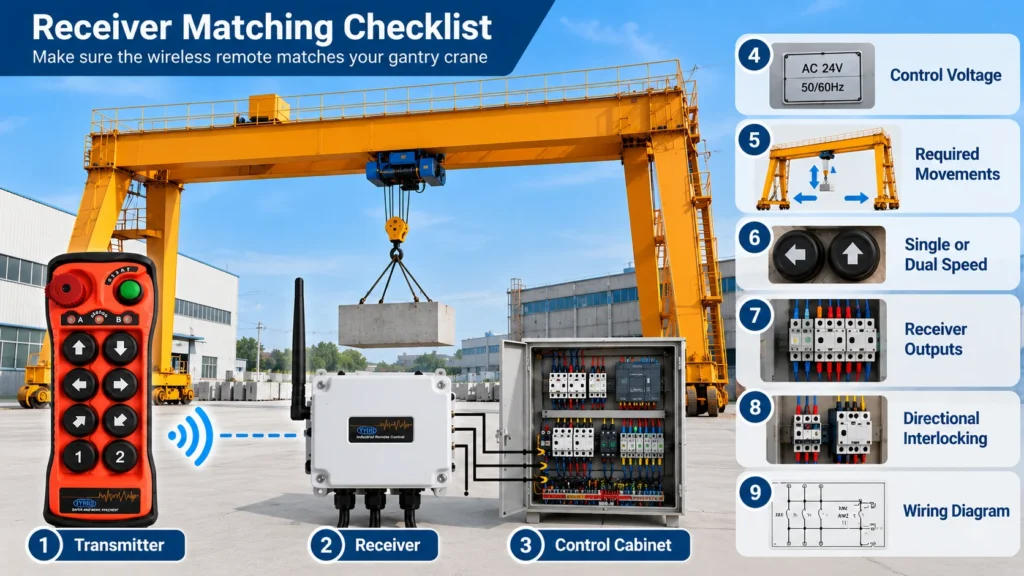
To recommend a suitable gantry crane remote control, please send the following information.
Crane Information
- Crane type
- Manufacturer and model, if available
- Indoor or outdoor use
- Gantry travel type
- Hoist and trolley configuration
Function Information
- Up / Down
- Left / Right
- Forward / Reverse
- Single or dual speed
- Start / Enable
- Horn
- Lighting
- Auxiliary functions
Electrical Information
- Control voltage
- Wiring diagram
- Control cabinet photo
- Existing pendant photo
- Contactor-coil labels
- PLC or drive information
Project Information
- Quantity
- Required operating distance
- Number of cranes in the same area
- OEM / private-label requirements
- Destination market
A wiring diagram is ideal. If it is unavailable, clear photos of the pendant, control cabinet and electrical labels can help with the initial review.
Do not disconnect unidentified wires only to take photographs.
Send Your Gantry Crane Wiring for Review
Why Choose JIAYI for Gantry Crane Remote Control?
Industrial Remote Control Focus
JIAYI provides wireless remote control systems for cranes, hoists and industrial equipment.
Configuration Support
We can help review:
- Crane movements
- Control voltage
- Speed logic
- Receiver outputs
- Wiring requirements
Multiple Control Options
Available configurations include:
- Push-button transmitters
- Single-speed control
- Dual-speed control
- Multi-button layouts
- Customized functions
- Special multi-receiver projects
OEM / ODM Support
Customization may include:
- Button labels
- Branding
- Receiver configurations
- Function programming
- Application-specific control layouts
Wiring Review
Customers can provide existing wiring information before ordering so the proposed transmitter and receiver configuration can be reviewed against the application.
Related Gantry Crane Remote Control Guides
Crane Remote Control Systems
Compare available JIAYI transmitter and receiver configurations.
View Crane Remote Control Systems
How to Choose a Crane Remote Control
Learn how to select by functions, voltage, speed and receiver requirements.
Read the Crane Remote Control Selection Guide
Wired vs Wireless Crane Control
Compare operator mobility, pendant limitations and system requirements.
Read Wired vs Wireless Crane Remote Control
Crane Remote Control Wiring
Understand how the transmitter, receiver and crane control circuit work together.
Read Transmitter, Receiver & Wiring Guide
Signal Stability and Operating Range
Learn what affects radio performance in factories and outdoor crane applications.
Read Wireless Range & Signal Stability Guide
Gantry Crane Remote Control FAQ
Can a gantry crane be controlled wirelessly?
Yes. Many gantry cranes can use industrial wireless remote control systems when the receiver is correctly matched to the crane control voltage, required movements and existing control circuit.
How many buttons does a gantry crane remote need?
A fixed hoist may require only two directions, while a hoist with powered trolley typically requires four. A motorized gantry crane commonly requires six directional commands for hoist, trolley and gantry travel. Additional functions may require more buttons.
Can a wireless remote control both the hoist and gantry travel?
Yes, if the transmitter and receiver are configured for all required movements and the receiver outputs are correctly integrated with the hoist, trolley and gantry control circuits.
Can a wireless remote control a dual-speed gantry crane?
Yes, provided the transmitter and receiver reproduce the original dual-speed control logic. The low- and high-speed output sequence should be confirmed before selection.
Is receiver voltage the same as the gantry crane supply voltage?
Not necessarily. The main crane power supply and control-circuit voltage may be different. Check the control transformer, contactor-coil labels or wiring diagram before selecting the receiver.
Can I replace a wired gantry crane pendant with wireless control?
Many pendant-controlled gantry cranes can be upgraded, but compatibility should be reviewed first. Direct-control or proprietary systems may require additional electrical modification.
Can wired and wireless controls remain on the same gantry crane?
In some systems, yes. A selector switch, electrical interlock or PLC source-selection arrangement may be required to prevent conflicting commands.
What information should I provide before ordering?
Provide the crane type, required movements, control voltage, single- or dual-speed requirements, operating environment, pendant photos and preferably a wiring diagram or control-cabinet photos.
Need a Wireless Remote for Your Gantry Crane?
Whether you are upgrading an existing pendant-controlled gantry crane or configuring wireless control for a new lifting system, correct receiver matching is the first step.
Send JIAYI:
Crane Type + Required Movements + Control Voltage + Speed Requirements + Wiring Information
and we can review the application and recommend a suitable transmitter and receiver configuration.
Primary CTA: Send Your Wiring for Review
Secondary CTA: Browse Crane Remote Control Systems