Short Answer
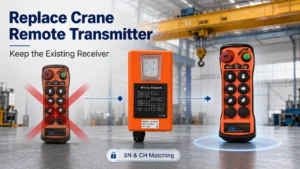
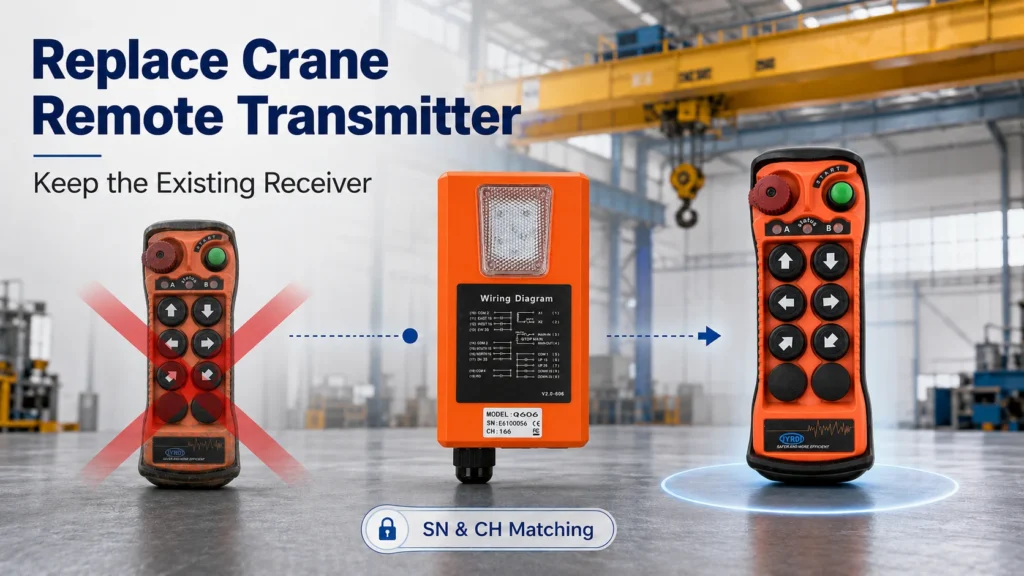
Yes, in many cases you can replace only the crane remote control transmitter if the existing receiver is still working correctly.
For compatible JYRDI remote control systems that support this replacement method, a new transmitter can be prepared to work with the existing receiver by using the correct pairing procedure or by configuring the required SN and CH information.
This means you may be able to keep the existing receiver and crane control wiring in place instead of replacing the complete transmitter-and-receiver set.
However, transmitter-only replacement should only be used after the model, system compatibility, receiver condition and matching method have been confirmed.
The Transmitter Is Broken — Do You Really Need a Complete New Remote Control System?
Not always.
A common situation with industrial crane remote controls is straightforward:
The handheld transmitter becomes damaged, worn, lost or no longer responds, but the receiver installed on the crane is still operating normally.
Some users immediately assume they need to replace everything:
Transmitter + Receiver + Wiring
In a compatible system, that may create unnecessary cost and work.
If the receiver is still healthy and the replacement transmitter can be correctly matched, the replacement may be much simpler:
Old Transmitter Damaged
↓
Confirm Model, SN and CH
↓
Prepare Compatible Replacement Transmitter
↓
Pair or Configure
↓
Keep Existing Receiver and Wiring
The important point is not simply whether the new transmitter looks the same.
The replacement must first be confirmed as suitable for the existing remote control system.
When Can You Replace Only the Transmitter?
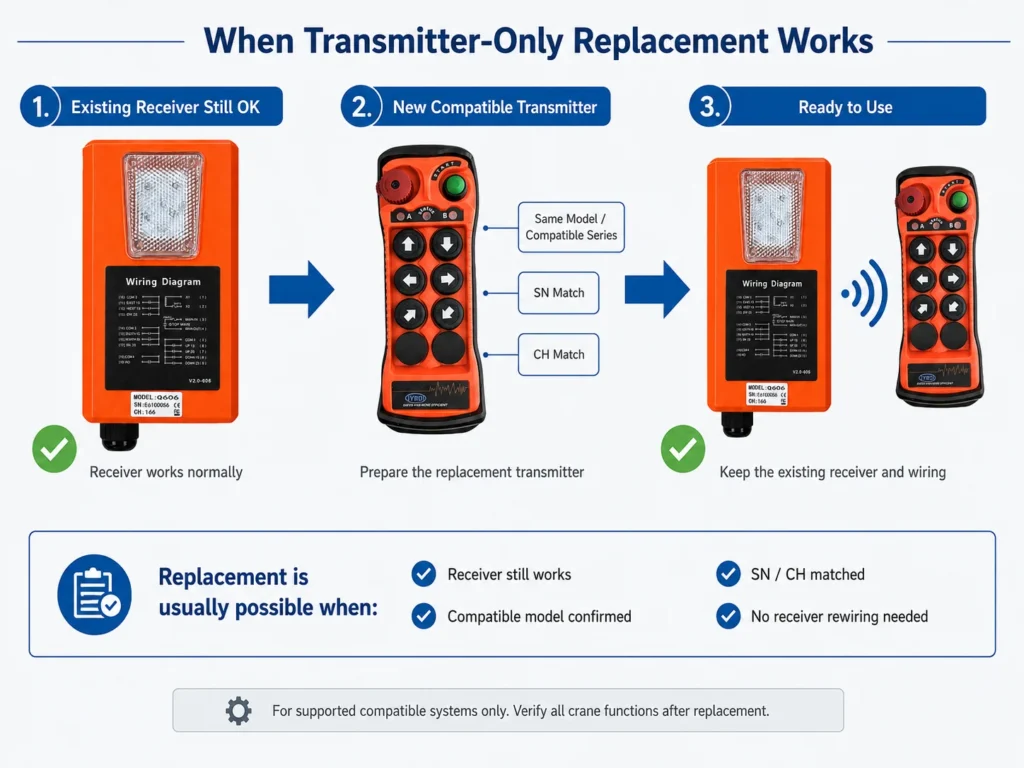
Transmitter-only replacement is most practical when the problem is limited to the handheld transmitter.
| Existing Condition | Recommended Action |
|---|---|
| Transmitter is damaged, receiver works normally | Transmitter-only replacement may be suitable |
| Transmitter is worn but still identifiable | Record model, SN and CH before replacement |
| Existing receiver operates normally | Receiver can usually remain installed |
| Crane wiring is operating correctly | Rewiring is normally unnecessary |
| Compatible replacement model is confirmed | Match the new transmitter to the existing system |
| Receiver is also faulty | Diagnose the receiver before replacing only the transmitter |
| Existing system cannot be identified | Confirm compatibility before ordering |
| Crane functions are being changed | Recheck the complete transmitter/receiver configuration |
The practical principle is simple:
Do not replace a working receiver simply because the handheld transmitter has failed.
But equally important:
Do not assume that any transmitter with the same number of buttons, appearance or frequency will work.
What Information Should You Check Before Ordering a Replacement?
Before buying a new transmitter, first identify the existing system.
For most replacement enquiries, the most useful information is:
| Information | Why It Matters |
|---|---|
| Model | Helps identify the correct transmitter series |
| SN | Used when preparing the replacement transmitter for supported systems |
| CH | Confirms the channel information used by the existing system |
| Old transmitter photo | Confirms button layout and physical model |
| Receiver photo | Helps identify the installed system |
| Receiver label | Provides additional matching information |
| Required functions | Confirms that the replacement has the correct controls |
| Single- or dual-speed operation | Prevents function mismatch |
A clear photograph of the label is often more useful than a description such as:
“I need a six-button crane remote.”
Two six-button transmitters can look similar while using different system configurations.
What Are SN and CH?
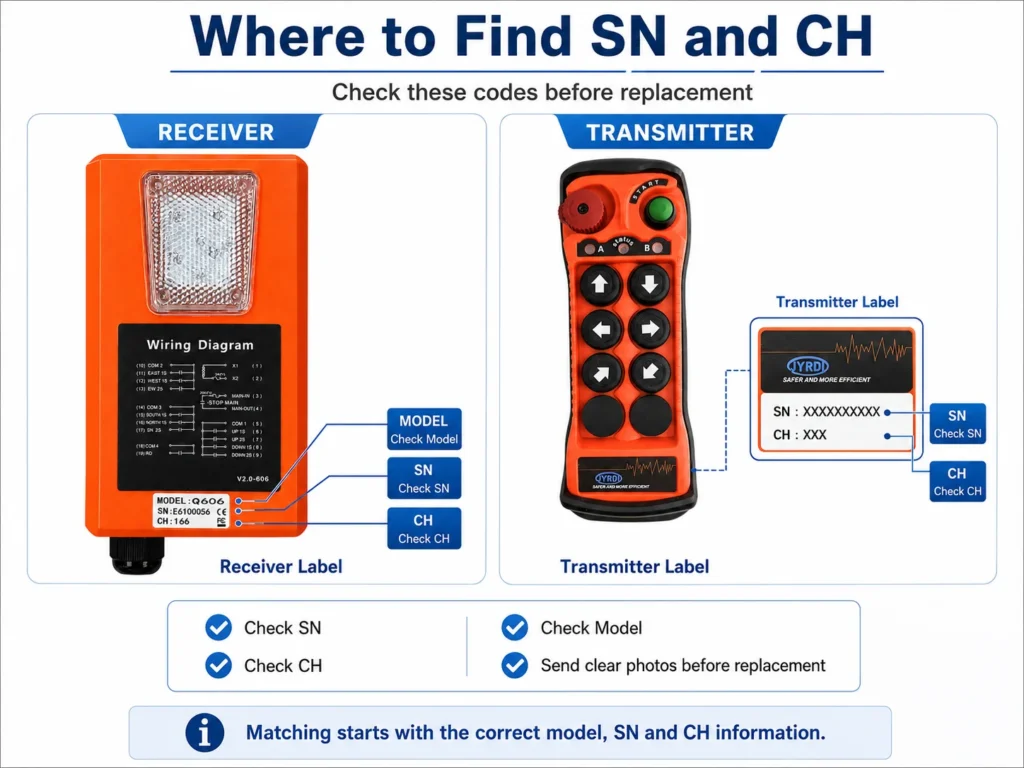
For supported JYRDI remote control systems, SN and CH are part of the information used when preparing a compatible replacement transmitter.
You do not normally need to understand the internal communication protocol in order to order a replacement.
What matters is identifying the correct information from the existing system.
For example:
Existing System
Model: Q606
SN: XXXXXXXX
CH: XXX
↓
Compatible Replacement Transmitter
Correct model
Correct SN
Correct CH
↓
Existing Receiver
The new transmitter can then be prepared using the applicable matching method.
Important
Matching the SN and CH does not mean that every transmitter becomes universally compatible.
The replacement model and matching method must first be suitable for the existing receiver.
Same Frequency Does Not Automatically Mean Compatible
One of the most common replacement mistakes is buying a transmitter simply because it uses the same frequency.
For example:
Same frequency ≠ same communication system
A replacement should not be selected based only on:
- frequency,
- button quantity,
- housing shape,
- or color.
Compatibility should be confirmed first, followed by the correct SN, CH or pairing configuration for the applicable model.
Two Ways to Prepare a Replacement Transmitter
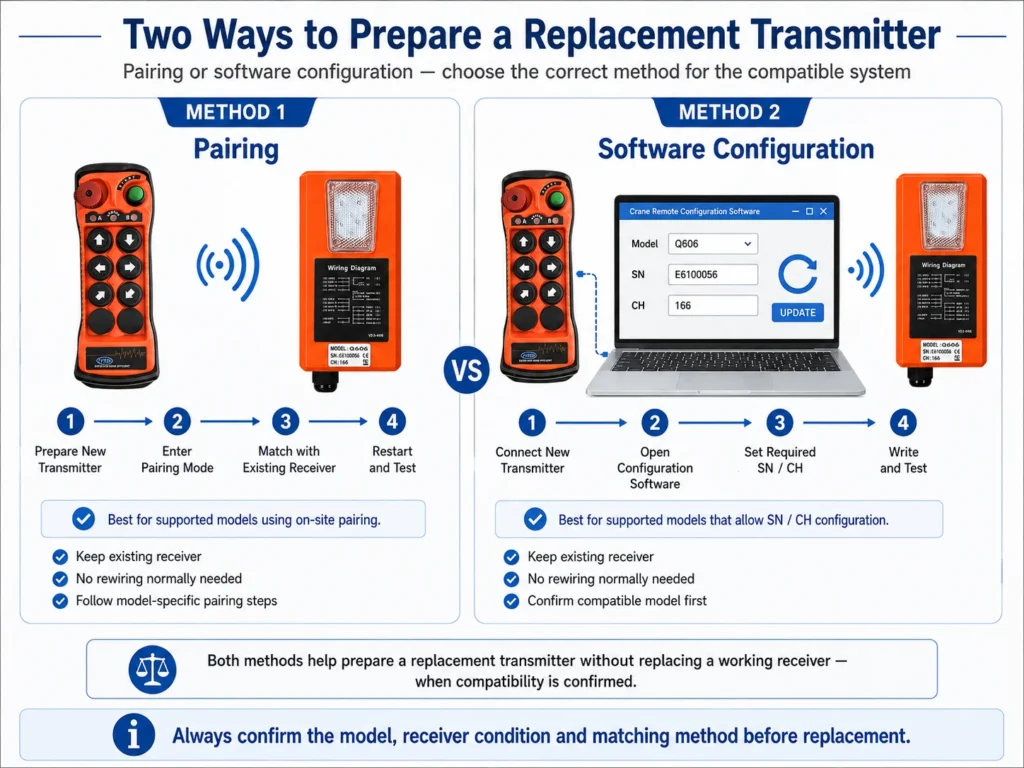
For supported JYRDI systems, there are two practical ways to prepare a new transmitter for an existing receiver.
They solve the same basic problem but are different procedures.
Method 1: Pair the New Transmitter with the Existing Receiver
For models that support on-site pairing, the replacement transmitter can be paired with the receiver using the corresponding pairing procedure.
If the receiver is already installed and functioning correctly, there is normally no reason to remove it from the crane or change its existing wiring simply to replace the handheld transmitter.
The general process is:
Replacement Transmitter
↓
Enter Pairing Mode
↓
Existing Receiver Enters Pairing Mode
↓
Complete Matching
↓
Restart and Test
Pairing Video
How to Pair a Replacement Crane Remote Control Transmitter with an Existing Receiver
The video should be treated as the operating reference for the corresponding model.
Pairing procedures can differ between product series, so users should follow the instructions for the specific transmitter and receiver being used.
Method 2: Configure the Replacement Transmitter Using SN and CH
For supported models, another option is to configure the new transmitter using the original system information.
JYRDI can provide the required transmitter configuration software for supported models.
The basic process is:
Step 1 — Record the Original Information
Confirm the existing:
Model + SN + CH
Take a clear photograph before discarding or removing the old transmitter.
Step 2 — Connect the New Transmitter
Connect the compatible replacement transmitter to a computer using the supported programming connection.
Step 3 — Open the Configuration Software
Read the existing settings of the replacement transmitter.
Step 4 — Configure the Required SN and CH
Set the replacement transmitter according to the SN and CH information required by the original compatible system.
Step 5 — Write and Verify the Settings
Write the settings to the replacement transmitter and confirm that the correct values have been saved.
Step 6 — Test the Transmitter with the Existing System
After configuration, verify the transmitter with the existing receiver according to the applicable model requirements.
For supported systems using this replacement method, correctly reproducing the required SN and CH allows the replacement transmitter to be prepared without changing the receiver wiring.
Pairing or SN / CH Configuration: Which Method Should You Use?
The answer depends on the remote control model.
| Method | What Happens | Receiver Replacement | Receiver Rewiring |
|---|---|---|---|
| Pairing | New transmitter is paired with the existing receiver | Normally no | Normally no |
| SN / CH Configuration | Compatible transmitter is configured with the required system information | Normally no | Normally no |
Do not assume that every model uses both methods in exactly the same way.
If you are unsure, send the model, SN, CH and product photos to the supplier before changing the transmitter configuration.
Do You Need to Rewire the Receiver?
Normally no, if the existing receiver and crane control circuit are already working correctly and only the transmitter is being replaced.
This is one of the main advantages of transmitter-only replacement.
Existing System
Old Transmitter ❌
↓
Existing Receiver ✅
↓
Existing Crane Control Wiring ✅
After Replacement
New Compatible Transmitter ✅
↓
Same Existing Receiver ✅
↓
Same Existing Crane Wiring ✅
The receiver stays installed.
The control cabinet connections stay unchanged.
The failed transmitter is the component being replaced.
This can help reduce:
- unnecessary electrical work,
- machine downtime,
- the possibility of wiring mistakes,
- and replacement cost.
However, if there is evidence of a receiver or control-circuit fault, the electrical system should be checked before assuming the transmitter is the only problem.
What If the Old Transmitter Is Completely Broken?
A transmitter that no longer powers on can still often provide useful identification information.
Before discarding it, check the label for:
- Model
- SN
- CH
Also take a clear photograph of the front button arrangement.
If the old transmitter label cannot be read, inspect the receiver label.
In many replacement enquiries, the receiver provides the information needed to identify the existing system.
The first step is therefore not:
“Buy another remote.”
It is:
“Identify the existing remote control system.”
What If the Original Transmitter Is Lost?
A lost transmitter should be treated differently from a transmitter that is physically damaged but still in your possession.
If a transmitter is lost, the original unit may still exist somewhere and could potentially remain part of the control environment.
Therefore, tell the supplier or responsible technician that the transmitter has been lost, rather than simply requesting a duplicate.
Depending on the system and site requirements, it may be more appropriate to:
- establish new matching information,
- perform a new pairing procedure,
- or otherwise prevent uncontrolled use of the missing transmitter.
This is particularly important in factories where:
- multiple cranes operate in the same area,
- several transmitters are in use,
- spare transmitters are managed,
- or equipment is shared between operators.
A replacement should restore control without creating uncertainty about which transmitter can operate the equipment.
What Should You Do with the Old Transmitter After Replacement?
If the original transmitter is still physically available but no longer required, remove it from service after the replacement transmitter has been commissioned.
Do not leave duplicate transmitters with identical matching information in uncontrolled use unless that operating arrangement is specifically supported and verified for the system.
For industrial lifting equipment, transmitter management is part of safe equipment management.
A replacement is not complete simply because the crane responds to the new transmitter.
The site should also know:
which transmitter is authorized to control which receiver.
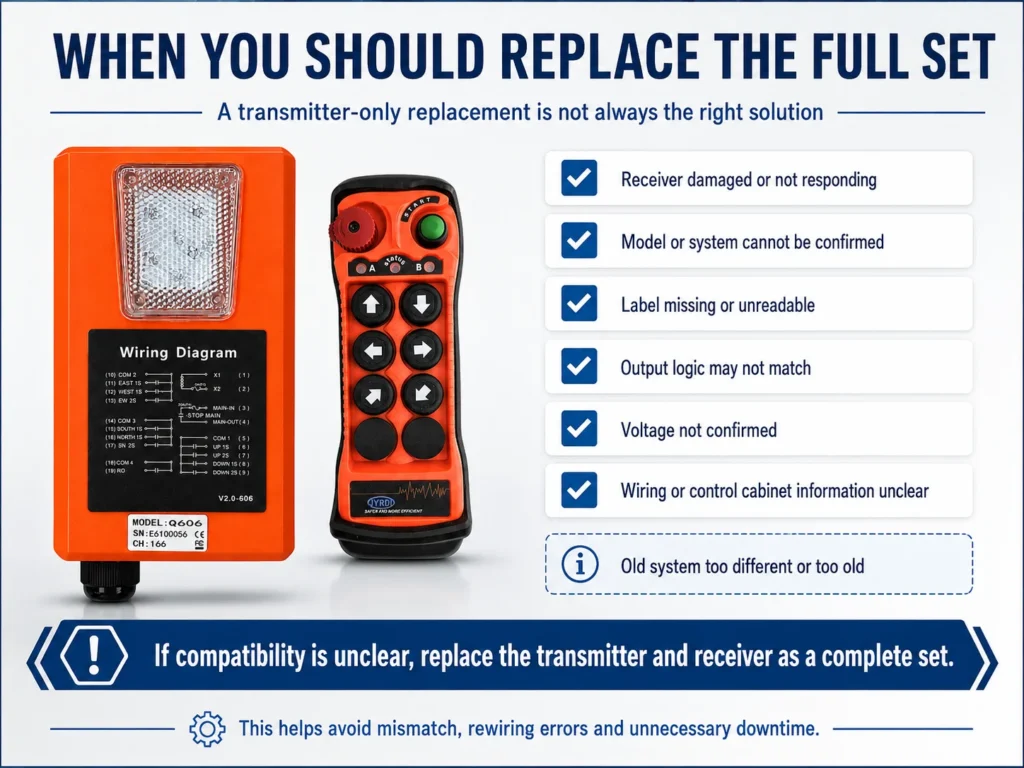
When Is Transmitter-Only Replacement NOT the Right Choice?
Replacing only the transmitter is not always the best solution.
The receiver or complete system should also be checked when:
- the receiver does not power on,
- receiver relay outputs are faulty,
- communication problems remain with a known-good transmitter,
- the receiver housing or internal components are damaged,
- the existing system cannot be identified,
- transmitter/receiver compatibility cannot be confirmed,
- the crane control functions have been changed,
- the system is being converted from single-speed to dual-speed control,
- PLC, VFD or contactor control architecture has been modified,
- or the existing remote control system has reached the end of its practical service life.
In these cases, simply copying the old transmitter settings may not solve the real problem.
Does Button Quantity Determine Compatibility?
No.
Button count is only one part of the remote control configuration.
A six-button transmitter may be used for:
- hoist,
- trolley,
- bridge travel,
but another six-button system may use a different function assignment or control logic.
Dual-speed systems can also require different command behavior from single-speed systems.
Technical Note
If your existing crane uses dual-speed movement or custom auxiliary functions, confirm the exact model and function configuration before ordering a replacement transmitter.
A transmitter that looks correct can still be electrically or logically unsuitable for the system.
Does Replacing the Transmitter Change the Crane Safety Circuit?
No. Replacing the transmitter does not redesign the existing crane safety architecture.
The receiver, crane control circuit and emergency-stop integration still determine the final behavior of the machine.
Therefore, after a transmitter is replaced, the actual system response must be verified.
The red emergency-stop button on the transmitter should not be considered the entire crane safety system by itself.
For a more detailed explanation of the control path, see:
Crane Remote Control System: Transmitter, Receiver, Wiring and Outputs Explained
The basic control sequence is:
Transmitter → Receiver → Relay Outputs → Crane Control Cabinet → Contactor / PLC / VFD → Crane Motion
The wireless remote sends control commands into this existing control architecture.
What Should Be Tested After Replacing the Transmitter?
A replacement transmitter should not be considered ready for service simply because one button makes the crane move.
The complete required function set should be verified.
Replacement Commissioning Checklist
| Function | Check |
|---|---|
| Power / Start | ☐ |
| Normal Stop | ☐ |
| Emergency Stop | ☐ |
| Hoist Up | ☐ |
| Hoist Down | ☐ |
| Trolley Left / Right | ☐ |
| Bridge Travel | ☐ |
| First / Second Speed, if applicable | ☐ |
| Auxiliary Functions | ☐ |
| Receiver Response | ☐ |
| No Unintended Commands | ☐ |
The crane should only return to normal operation after the replacement transmitter has been verified with the actual control system.
For industrial equipment, final commissioning and electrical verification should be performed by appropriately qualified personnel.
When a Complete Remote Control System Is the Better Replacement Option
Replacing only the transmitter may be possible when the existing receiver supports a compatible transmitter and the required pairing or configuration method is available.
If compatibility cannot be confirmed, or the existing system has unsuitable control functions, damaged components, or incompatible communication requirements, replacing the transmitter and receiver together may be more practical.
Explore JIAYI’s complete crane remote control system options for replacement and retrofit applications. Confirm the receiver voltage, output wiring, control functions, and safety requirements before ordering.
Common Mistakes When Replacing a Crane Remote Transmitter
Replacing the Whole System Too Quickly
If only the transmitter is damaged and the receiver remains healthy, replacing the receiver and rewiring the control cabinet may be unnecessary.
Ordering by Appearance
A similar housing does not confirm compatibility.
Looking Only at Frequency
The same frequency does not automatically mean that two transmitters use the same communication or matching system.
Recording Only the Button Count
“6 buttons” or “8 buttons” is not enough information for accurate replacement.
Throwing Away the Old Transmitter Too Early
Always photograph the model, SN, CH and front button layout first.
Rewiring a Working Receiver
Do not disturb correctly functioning crane wiring simply because the handheld transmitter failed.
Treating Configuration Software as a Universal Compatibility Tool
Changing SN and CH does not make an unrelated transmitter compatible with any receiver.
The correct compatible model must be confirmed first.
Failing to Test All Crane Functions
A successful connection does not automatically prove that every direction, speed stage, stop function and auxiliary command is correct.
What Information Should You Send JYRDI?
You do not need to diagnose the entire remote control system yourself.
For an initial replacement check, send us:
| Required Information | Example |
|---|---|
| Old transmitter photo | Clear front view |
| Receiver photo | Clear full view |
| Model | Q606 / other model |
| SN | As shown on label |
| CH | As shown on label |
| Button configuration | 2 / 4 / 6 / 8 / 10–12 buttons |
| Speed type | Single-speed / dual-speed |
| Problem | Damaged / lost / intermittent / no power |
If the label is unclear, send several close-up photos instead of guessing the numbers.
Need to Replace a Damaged Crane Remote Transmitter?
If your handheld transmitter is damaged but the existing receiver is still working, you may not need to replace the complete crane remote control system.
For compatible JYRDI systems, a replacement transmitter may be prepared using the applicable pairing procedure or the required SN and CH information while keeping the existing receiver and wiring in place.
Send us:
Model + SN + CH + Transmitter Photo + Receiver Photo
We can help you determine whether transmitter-only replacement is suitable before you order.
Check Replacement Compatibility →
FAQ
Can I replace only the crane remote control transmitter?
Yes, if the existing receiver is working normally and a compatible replacement transmitter can be correctly matched to it. For supported JYRDI systems, this may be done through the applicable pairing method or SN/CH configuration.
Do I need to replace the receiver when the transmitter breaks?
Not necessarily. If the receiver and existing crane control wiring are functioning correctly, they can often remain in place while only the transmitter is replaced.
Does the new transmitter only need the same SN and CH?
Not by itself. The replacement transmitter must first be a compatible model for the existing system. For supported models, the required SN and CH can then be configured according to the original system information.
Is the same frequency enough to make two crane remote transmitters compatible?
No. Frequency alone does not confirm compatibility. Model, communication system, matching method and required configuration should also be confirmed.
Do I need to rewire the crane when replacing only the transmitter?
Normally no, provided the existing receiver and crane control circuit are already operating correctly and only the handheld transmitter is being replaced.
Can the SN and CH of a replacement transmitter be changed?
For supported JYRDI models, the replacement transmitter can be connected to the applicable configuration software and the required SN and CH can be set according to the existing compatible system.
What if my old transmitter is lost?
Tell the supplier that the transmitter has been lost. Do not automatically duplicate its settings without considering whether the missing transmitter could still be used. Depending on the system and site requirements, new pairing or matching information may be more appropriate.
What should I send when asking for a replacement transmitter?
Send clear photos of the old transmitter and receiver, together with the model, SN, CH, button configuration and whether the system is single-speed or dual-speed.